
USA TODAY: US & Breaking News
USA TODAYNews & Magazines
4.215.19K Reviews
- Version
- 8.10.3
- Installs
- 5.00M
- Age Rating
- Everyone 10+
Screenshots



Our Review of USA TODAY: US & Breaking News
 Analysis by Appyee
When I open USA TODAY: US & Breaking News for the first time, I would not try to explore every section at once. I’d start by checking the main feed, choosing a couple of subjects I genuinely follow, and seeing whether the mix feels useful during a normal day. That small test is a better guide than a long list of features: a news app earns a place on my phone when it helps me understand what matters without turning every spare moment into a scroll.
USA TODAY is a free news and magazine app from USA TODAY, with optional in-app purchases ranging from $4.99 to $129.99 per item. It is rated for Everyone 10+, has a 4.2 average from around 58,000 ratings, and has been installed over 5 million times. The current version is 8.5.2, and it requires Android 8.0 or later. Those details make it easy to judge the practical fit: it is accessible to a broad audience, but the paid options mean I would check what is included before committing to a purchase.
What to expect from the daily news mix
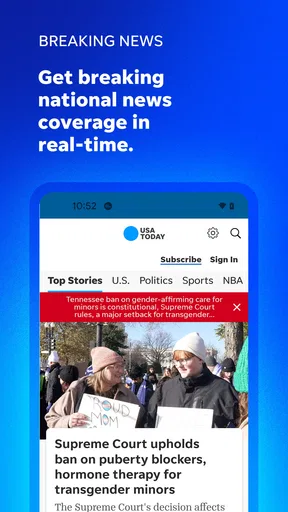
The app is aimed at readers who want national headlines, breaking coverage, world news, and local reporting in one place. That broad range is convenient when I want a quick overview rather than opening several separate sources. It also means the experience is not automatically tailored to one narrow interest; I still need to choose what I care about and decide which stories deserve more than a glance.
I would treat the home screen as a starting point, not a complete picture of the day. A prominent headline can help me spot a developing story, while the sections let me move toward a particular subject. For a first-time reader, the useful habit is to scan first, open only the stories relevant to a decision or conversation, and come back later for deeper reading. That keeps a general-news feed from becoming an endless queue.
Getting comfortable with the first setup
Once the app is installed, I’d take a minute to look through its sections and select a few topics that match my routine. The point is not to make the feed perfectly personalized on day one. It is to give it enough direction that the next visit feels relevant—perhaps local coverage for the area I care about, alongside a broader interest such as world news or sports.
I’d also be deliberate about alerts. Breaking-news notifications are useful when I want to know about major developments promptly, but frequent interruptions can make it harder to focus. If I am unsure, I would begin with the most important alerts and adjust after a few days. The best setup is the one that informs me without making me feel obliged to check the phone every time it lights up.
Diving Into the Features
One of the first things I noticed about the USA TODAY: US & Breaking News app is its clean and intuitive interface. It's like stepping into a well-organized library where everything is at your fingertips. The app opens up to a homepage filled with top stories, which are updated regularly so you're always getting the latest scoop. You can easily swipe through different categories like politics, sports, and entertainment, making it super easy to find what you're interested in.
For those who are visually inclined, you'll appreciate the app's focus on multimedia content. There are plenty of videos and photo galleries that bring stories to life. It's not just about reading articles; it's about experiencing the news in a more dynamic way. Plus, if you're on the go and can't read, the app offers audio versions of top stories – a feature I found incredibly useful during my morning commute.
Making the first visit useful
My first meaningful use would be a short morning check rather than an attempt to read everything. I’d scan the top stories, open one national or world report that affects my understanding of the day, then check the local angle if it matters to my plans. If I’m commuting, audio versions of top stories offer another way to keep up when reading is inconvenient. I’d save longer attention for later instead of trying to absorb a whole news cycle between stops.
That routine also gives me a quick way to judge whether my choices are working. If the feed keeps surfacing subjects I don’t care about, I would revisit the topics I selected rather than assume the app has to stay that way. If I only need a fast alert about a major event, I’d use notifications for that purpose and avoid treating each alert as a demand to read several more stories.
Customizing Your News Feed
Customization is key in today's digital age, and this app doesn't disappoint. You can personalize your news feed by selecting your favorite topics. Whether you're into tech, health, or world news, you can tailor the app to show you what matters most. It's like having a personal news curator in your pocket.
Notifications are another handy feature. I know, I know—notifications can be annoying. But here, they’re quite the opposite. You can choose to receive alerts on breaking news, major events, or just stick to daily briefings. This way, you're always informed, but not overwhelmed.
Keeping a healthy boundary with alerts
A useful trade-off is to separate “I need to know this now” from “I’d like to read this when I have time.” I’d reserve immediate alerts for developments I truly want pushed to me and let ordinary browsing handle the rest. That distinction matters especially on busy workdays: a steady stream of updates can make a reader feel informed while actually fragmenting attention.
For a household or a group of friends, a local story can also be a practical conversation starter: I might check a report before making plans, then share the gist in person rather than forwarding every headline. I would still read the article itself before drawing a conclusion, particularly on a fast-moving subject. A headline is useful for orientation, not a substitute for context.
User Experience and Design
Let's talk about user experience. The app is incredibly user-friendly, which is a huge plus for someone who's not the most tech-savvy. Navigation is smooth, with everything well-labeled and easy to find. The color scheme is pleasant, making it easy on the eyes, especially during those late-night news binges.
One small hiccup I did notice was the occasional delay in loading content, particularly when switching between categories. But honestly, it's a minor issue that doesn't detract from the overall experience. The ads are there, but they’re not intrusive, which is something I really appreciate.
Working around the occasional friction
If a story takes a moment to load, I would avoid tapping repeatedly or jumping back and forth between sections. I’d give the page a moment, then return to the feed if it still hasn’t appeared. That is a small but useful habit in any news app: repeated taps can leave me unsure which screen is active, while a brief pause keeps the reading flow clear.
Ads are part of the experience described here, so readers who want a completely uninterrupted news session may prefer a different arrangement or a source with a format they find less distracting. I also would not choose this app as my sole source for a specialist subject. Its strength is a broad news mix; when I need technical depth or a highly focused beat, a dedicated publication is likely the better companion.
How it fits beside other news options
Compared with checking a search feed or several publisher apps, this app is useful when I want a single starting point for national, world, and local coverage. A search engine can be quicker when I already know the exact question, and a specialist publication can go deeper on one topic. I would use USA TODAY for a general scan and switch to a focused source when the story calls for more expertise or detail.
It is also different from relying only on social feeds. Social posts can surface a story quickly, but the surrounding commentary may make it harder to separate reporting from reaction. Here, I can begin with an article and then, where available, look at the community conversation as a separate layer. I would not treat comments as a substitute for the article or as proof that a claim is accurate.
The Community Aspect
One feature that stood out to me was the app's community engagement tools. You can engage in conversations through comment sections and see what others are saying about the day's events. It's a fantastic way to see different perspectives and engage with a broader community. Plus, the app encourages civil discourse, ensuring debates remain respectful and constructive.
For a first-time user, I’d read a few comments before joining in and keep the distinction between personal reactions and reported information clear. A discussion can show how readers interpret an event, but it can also pull attention away from the facts of the story. If I find that a particular thread is more distracting than useful, I can simply return to the article or move on; participation is not necessary to get value from the news feed.
Who will get the most from it
I think it suits someone who wants a familiar, broad overview and appreciates having multiple types of coverage in one app. It is especially practical for a reader who checks headlines in short bursts, follows a mix of national and local stories, or prefers listening to some top stories while on the move. A first-time user does not need to master every section: a few chosen topics, a sensible alert setup, and one daily check are enough to discover whether the app fits.
I would be less likely to recommend it to someone who wants only one subject, dislikes advertising, or expects every story to offer specialist-level analysis. Those readers may be happier with a focused publication or a different news source. Likewise, if notifications tend to interrupt your concentration, keep them limited or skip them; the app can still serve as something you open intentionally rather than something that calls for attention throughout the day.
Costs, choices, and a sensible next step
The app is free to get, while optional in-app purchases are available. I’d explore the basic reading experience first and only consider a purchase if I understand what it unlocks and expect to use it regularly. The listed purchase range runs from $4.99 to $129.99 per item, so it is worth checking the exact item and terms in the app before confirming anything. The free starting point makes it possible to test the fit without paying upfront.
After a few days, I’d make one simple decision: keep the app if its mix of headlines and coverage helps me stay oriented, or adjust my topics and alerts if it feels noisy. If the need is deeper reporting on one beat, I’d pair it with a specialist source rather than asking a general news app to do everything. That is the most useful way to approach it: as a convenient daily doorway, not the only place to look for every answer.
Final Thoughts
All in all, the USA TODAY: US & Breaking News app is a solid choice for anyone looking to stay informed. It's comprehensive, easy to navigate, and packed with features that make consuming news a breeze. Whether you're a news junkie or just someone who likes to stay updated on the go, this app delivers a seamless experience.
So, if you're ready to dive into a world of up-to-date news wrapped in a user-friendly package, give this app a shot. It's like having a personal newsroom in the palm of your hand, and who wouldn't want that?
Verdict
Strengths of USA TODAY: US & Breaking News
- Comprehensive news coverage.
- User-friendly interface.
- Customizable news alerts.
- High-quality multimedia content.
- Real-time updates.
Limitations of USA TODAY: US & Breaking News
- Ad-heavy experience.
- Occasional slow loading.
- Limited offline access.
- Some regional content missing.
- Subscription for premium content.
Similar Picks in This Category
View All
Google News - Daily Headlines
Google LLC4.0

X
X Corp.4.8

Flipboard:Your Social Magazine
Flipboard3.4

Opera News: breaking & local
Opera4.5

Hindi News by Dainik Bhaskar
Dainik Bhaskar Group4.0

Way2News Daily News App
Way2News ( Formerly Way2SMS )4.6
Frequently Asked Questions
What features does the USA TODAY app offer?
The USA TODAY app provides users with up-to-date news coverage, including breaking news alerts, personalized news feeds, and in-depth articles on various topics such as politics, entertainment, and sports. The app also features interactive content like videos and photo galleries, allowing users to engage with stories in multiple formats.
Is the USA TODAY app free to use?
Yes, the USA TODAY app is free to download and use. However, it may offer in-app purchases or subscriptions for additional content or features. Users can enjoy a wide range of news articles and multimedia content without any cost, but premium features might require a subscription.
How can I customize my news feed on the USA TODAY app?
Users can customize their news feed by selecting preferred topics and regions. The app allows personalization so you can follow specific interests such as business, technology, or health. This helps tailor the news experience to match individual preferences, ensuring that the most relevant stories are prioritized.
Does the USA TODAY app require an internet connection to function?
Yes, the USA TODAY app requires an internet connection to access the latest news updates and multimedia content. While some articles may be accessible offline, users need an active connection to receive real-time news alerts and updates. The app is designed to provide timely information, which necessitates connectivity.
How does the USA TODAY app handle user privacy and data?
USA TODAY is committed to user privacy and follows strict data protection policies. The app collects data to improve user experience and content personalization but adheres to privacy regulations. Users can review the app’s privacy policy for details on data usage and have the option to manage their privacy settings within the app.
